


Instructions for Chairs and Presenters
For Chairs
- Please come to the room of the session over which you preside at least 20 minutes before the beginning of the session. Please inform your arrival to a room staff.
- Please take the chairperson’s standby seat before the beginning of your session.
- Some sessions have MCs. If your session does not have MC, please open the session at a start time.
For Presenters
Presentation Time
Please follow the schedule and instructions sent by the congress secretariat, and during the session, please follow the session chairs’ directions.
Conflict of Interest Disclosure (COI)
- A first author must disclose whether there are any conflicts of interest (COI).
- We ask you to include a slide regarding your COI at the beginning or end of your presentation.
Please refer to the following site.
Projection and Technical Setting
- PowerPoint is the only communication tool available in all session rooms.
- Slide projectors are not available.
- There is only one projector in each session room.
- Speakers are kindly asked to observe that only computers with Windows11 PCs with Microsoft PowerPoint 365 installed provided by the congress may be used for showing your presentations.
- Only Windows computers support presentations using data from USB memory sticks.
- All PowerPoint presentations must be handed in at the PC preview center at least 1 hour prior to your session.
- If you are presenting from a Mac, please be sure to bring your own Mac laptop.
- If you use Movie file on your presentation, please be sure to bring your own laptop.
For Speakers Who Bring Their Own Laptop
- Please visit the PC preview center at least 1 hour prior to your session to verify the correct output to the equipment.
- After you finish checking your presentation, please personally bring your laptop to the operator’s desk near the lectern at the front left of the venue at least 30 minutes before your presentation session begins. Your laptop will be returned to you at the operator’s desk immediately after your presentation ends.
- Please be sure to bring your own AC adapter.
- The HDMI output connection is used to connect the laptop to an external monitor and data projector. If your laptop requires a special video output cable that is compatible with the laptop, please be sure to bring your conversion connector.
- Please make sure to cancel your setting in advance such as Screen saver, virus check system and a power-saving mode setting.
At the Podium
Your presentation data will be displayed on a monitor on the podium.
Please use the equipment provided on the podium.
PC Preview Center
Please register your presentation at PC Preview Center at least 1 hour before the beginning of your session.
Please note that you will be only able to register at the facilities you have the presentation.
| Location (Presentation Facilities) | Friday, June 19th | Saturday, June 20th | Sunday, June 21st |
|---|---|---|---|
| Lecture room No. 1 – No. 8 In front of “Oowada,” South Wing, 1st Floor, Kobe Portopia Hotel |
7:15-17:30 | 7:15-17:30 | 7:15-15:00 |
| Lecture room No. 9 – No. 11 In front of “Kairaku,” Main Building, B1 Floor, Kobe Portopia Hotel |
|||
| Lecture room No. 12 – No. 17 Foyer, 3rd Floor, Kobe International Conference Center |
|||
| Lecture room No. 18 – No. 21 Hall 1, 1st Floor, Kobe International Exhibition Hall |
Operators will copy and save your presentation data to the server.
Your presentation data will be deleted immediately after the end of the meeting.
At the Podium During your Presentation for the JSDT2026
- Please use a mouse and keypad provided on the podium table. Each presentation must finish in its allotted time.
- Please follow the schedule and instructions sent by the congress secretariat, and during the session, please follow the session chairs’ directions.
Guidelines for Poster Preparation
Conflict of Interest Disclosure (COI)
- A first author must disclose whether there are any conflicts of interest (COI).
- We ask you to include a slide regarding your COI at the beginning or end of your presentation.
Please refer to the following site.
Guidelines for Poster session speakers
Guidelines for Poster Preparation
Please ensure that the text size is large enough to be easily read from a distance, and that all charts, tables, and photos are clear and high-quality.
Poster Panels / Size
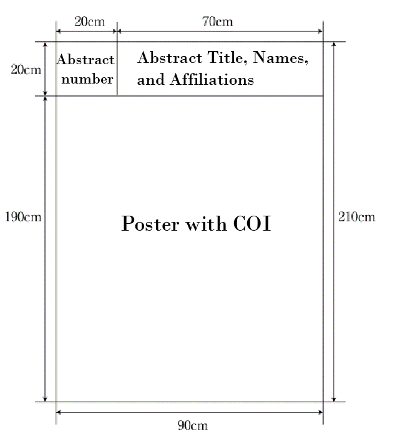
- Your abstract number (20cm×20cm) will be placed on your assigned board by the congress secretariat (left upper corner).
- Please prepare a title (20cm×70cm) separately from the main poster, which should include the abstract title, and the authors’ names and affiliations.
- The main poster should be no larger than 190cm×90cm.
- Poster is not necessary that it is one sheet.
- Please include COI at the top or bottom of the poster.
- Pins for fixing posters will be available on the poster board. Do not use your own pins or tapes.
Poster Set Up and Removal of Poster
Venue for poster presentation: World Hall
Poster set-up
- Please set up your poster on the board assigned to you at the venue within the designated time frame.
Presentation method and time
- Stand by your poster board during the time frame specified in the program.
Removal of poster
- Please remove your poster after the final session without delay.
| Friday, June 19th | Saturday, June 20th | Sunday, June 21st | |
|---|---|---|---|
| Set Up | 8:30-10:00 | 8:30-10:00 | 8:30-10:00 |
| Presentation | 11:00-12:15 15:30-16:35 |
10:30-11:45 15:30-16:45 |
10:30-11:35 13:50-15:05 |
| Removal | 16:35-17:00 | 16:45-17:15 | 15:05-15:30 |
Please note that any posters remaining on the board after the removal time will be removed and disposed of by the congress secretariat.
Poster Presentation and Discussion
- Please follow the chairperson’s instructions for your poster presentation and discussion, and adhere strictly to the allotted presentation time.
- You have 6 minutes for presentation and 2 minutes for discussion.
- Please refer to the program booklet for the presentation times of each session.