
For Speakers

Information for oral presentations

Slide of Conflicts of Interest (COI)

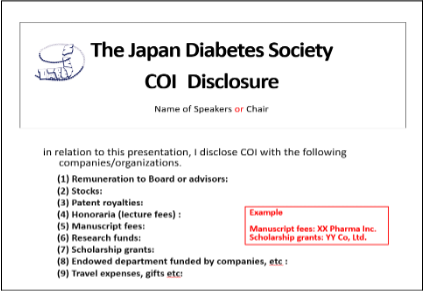
The presenters are kindly requested to announce the relevant COI situation in the slide after the one that introduces the title and presenters.

Sample slide of disclosure

If you do not have any COI to disclose.

If you have any COI to disclose.
Submitting Your Presentations

Checking in at the PC Center is the most important step you will have to take to ensure a successful presentation. All oral presenters are required to check in at the Speaker Ready Room, preferably 60 minutes before the session starts, or 15 minutes before the session starts if the session starts early in the morning.

PC Center

The slides are received at the place where your presentation is allocated.
Please come to the PC Center of the venue of your session.

Presentation venue Reception Reception hours
21(THU) 22(FRI) 23(SAT)
Osaka International Convention Center 10th Floor,
‘10-1, 10-2’
7:30 -18:10 7:15 -17:30 7:15 -16:00
RIHGA Royal Hotel Osaka, East Wing 3rd Floor,
‘Yuki no Ma’
7:30 -18:10 7:15 -17:30 7:15 -16:00

  • Osaka International Convention Center, 10th Floor ‘Room 10-1,10-2’
  • RIHGA Royal Hotel Osaka, East Wing 3rd Floor ‘Yuki no Ma’

At the PC Center, please make sure all fonts, images, and animations appear as expected and that all audio and video clips if any are working properly.
After the congress, we delete any copies of your presentation data file on congress PC.

Presentation Equipment

  1. All the meeting rooms will be equipped with Windows PC. OS: Windows 10/ Application: PowerPoint 2021
  2. Presentations can be given using data stored on a USB flash memory drive. Data size: Up to 1GB Screen resolution: Full HD (1920 x 1080)
  3. Please be sure that changing/revising the slides at the meeting room is not allowed. If those who would like to change/revise the slides after checking-in at the PC Center, they are requested to come back to the PC Center to do it 30 minutes prior to the session at the latest.
  4. If your presentation by Macintosh and/or contains video files, you are kindly requested to bring your own laptop.

Laptop Users

Please make sure to bring your own AC adaptor, auxiliary output adaptor (D-sub 15 pin) and connector. Please cancel screensaver and the power saving setting in advance. Be sure to bring a backup copy of your presentation with you to the conference venue.

If you have data with a movie and/or sound, please inform the technician at the Speaker Ready Room. Please bring your PC to the technical staff table which is located down the podium in your session room, at the latest 30-60 minutes prior to the session starting. Please complete any revision of your slides before the above time. After your session, please come to the technician’s desk to have your PC returned.